Typical uses include contracts, certificates, letters, forms, invoices, and any repeating document where only selected fields change.
Key features
- Create many documents from a single Word template
- Fill multiple placeholders from multiple Excel files
- Document names come from an Excel range (column or row series)
- Export as Word (.docx), PDF, or both
- Works even if Excel/Word files are already open
- Remembers your last mission settings between sessions
- English and Arabic interface
- Progress counter while generating (for example 8/20)
Requirements
- Windows 10/11
- .NET 8 Desktop Runtime
- Microsoft Word installed (required only if you export PDF)
- Excel files in .xlsx / .xlsm format
- Word template in .docx format
Complete guide to use
1) Prepare your Word template
Open your base Word file and type the placeholders exactly where the final text should appear.
Important tips:
- Format each placeholder the way you want the final text to look (font, size, bold, color, RTL/LTR).
- The filled value keeps the placeholder formatting.
- Use clear placeholder text, for example ClientName, Address, or your own Arabic/English labels.
- English placeholders are matched without caring about letter case (Name = name). Arabic placeholders are matched exactly.
2) Prepare your Excel files
You need:
- One Excel file for document names (what each output file will be called)
- One or more Excel files for placeholder values
Each series starts at a cell you choose (for example A1 or C5):
- Column series: A1, A2, A3, …
- Row series: A1, B1, C1, …
Make sure every required cell in the range is filled. Empty cells will stop generation with a clear error.
3) Set how many documents to create
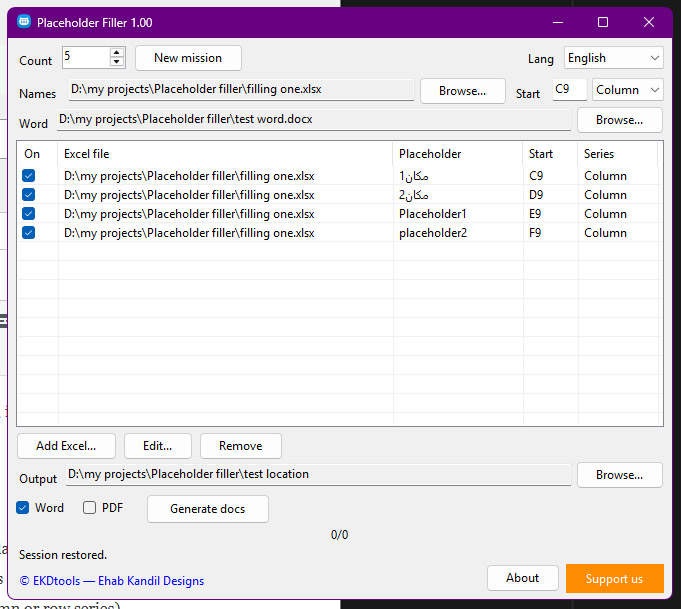
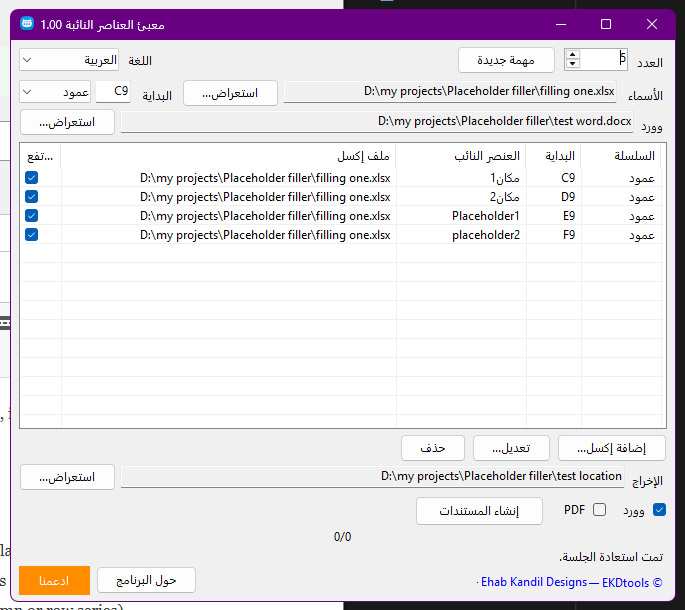
In the app, enter Count (for example 10). The app reads that many values from each selected Excel series.
4) Choose the Names Excel
- Click Browse… next to Names
- Select the Excel file that contains the output document names
- Enter the start cell (for example C5)
- Choose Column or Row
5) Choose the Word template
Click Browse… next to Word and select your .docx template with placeholders.
6) Add Excel mappings for placeholders
- Click Add Excel…
- Select an Excel data file
- In the popup, enter:
- Start cell (example: A1)
- Placeholder text exactly as it appears in Word
- Series type: Column or Row
- Repeat for every placeholder you want filled
- Use the checkbox in the list to enable/disable a mapping without deleting it
- Use Edit… to change a mapping, or Remove to delete it
- Click list headers to sort by Excel file or placeholder
7) Choose the output folder
Click Browse… next to Output and select where generated files should be saved.
8) Choose output formats
- Word: creates .docx files
- PDF: creates .pdf files (needs Microsoft Word)
- You can select both
9) Generate
Click Generate docs.
Before generation starts, the app:
- Checks that required Excel cells are not empty
- Warns you if existing Word/PDF files will be replaced
Then it creates the documents one by one and shows progress (for example 8/20).
10) New mission
Click New mission to clear the current job settings and start fresh.
Language preference is kept and is not cleared by New mission.
Tips for best results
- Keep placeholder text unique so replacements do not collide
- Prefer placeholders typed as one continuous piece of text in Word
- File names are taken from Excel and cleaned if they contain invalid characters
- You can leave Excel/Word source files open while generating
- Switch interface language anytime (English / Arabic)
Terms of use
License summary
Placeholder Filler is provided by EKDtools / Ehab Kandil Designs.
Free for personal use only.
Personal use means private, non-commercial use by an individual for personal documents.
Not free for:
- Business use
- Commercial use
- Administrative / organizational use
- Use inside companies, offices, freelancing services sold to clients, government or institutional workflows
For business, commercial, or administrative licensing, please contact us for a quotation:
Shop and products: https://ehabkdesigns.com/shop/
Support free development: https://ehabkdesigns.com/support-our-free-software-development/
Acceptable use
- Do not redistribute the application as paid software without written permission
- Do not remove credits, copyright notices, or licensing notices
- You are responsible for the content of documents you generate and for having rights to the templates/data you use
Disclaimer
The software is provided as-is. EKDtools / Ehab Kandil Designs are not liable for data loss, incorrect output, business interruption, or damages arising from use of the software. Always review generated documents before sending or publishing them.
Contact
EKDtools / Ehab Kandil Designs
Email: info@ehabkdesigns.com