EKD Temp Cleaner — simple, safe, and fast cleanup
Features & Cleanup Options
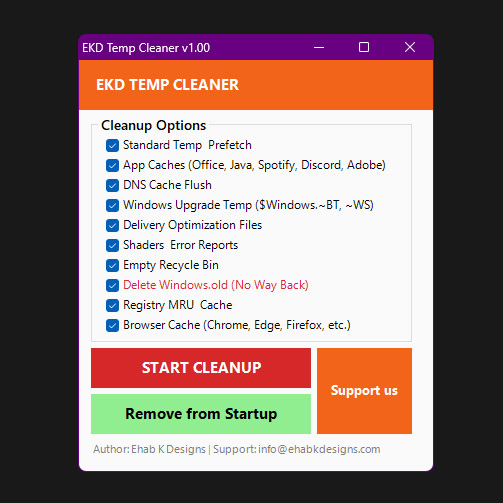
EKD Temp Cleaner removes temporary files, caches, and common clutter to help reclaim disk space and keep Windows running smoothly.
You stay in control — every cleanup category can be enabled or disabled.
What makes it convenient
- Remembered choices: your last selections are saved automatically
- Instant saving: every check/uncheck is saved immediately — no “Save” button needed.
- Silent mode: running with
-silent cleans only the items you approved last time.
- Startup option: a one-click option can add/remove a Scheduled Task to run
-silent after logon.
Quick safety note
Most options remove temporary/cached files. One option is intentionally marked as critical:
Delete Windows.old (No Way Back)
This removes C:\Windows.old (if it exists) and can prevent rolling back to the previous Windows installation.
EKD Temp Cleaner shows a confirmation warning before deleting it.
Tip: Close browsers and heavy apps before cleaning for best results.
Cleanup Options
Each option can be enabled/disabled from the app.
Standard Temp & Prefetch
Recommended
Cleans common Windows temp locations and Explorer caches.
- %TEMP%\*
- %TMP%\*
- C:\Windows\Temp\*
- C:\TEMP\*
- C:\Windows\Prefetch\*
- Explorer thumb/icon caches (thumbcache_*.db, iconcache_*.db)
- Recent items / jump lists
- CrashDumps
- App package temp caches (LocalCache / TempState for installed packages)
App Caches (Office, Java, Spotify, Discord, Adobe)
Recommended
Removes caches for common apps to free space and reduce clutter.
- Office file cache
- Java deployment cache
- Spotify cache/data
- Discord caches (Cache / Code Cache / GPUCache)
- Adobe Acrobat/Reader caches
Flushes Windows DNS resolver cache (runs ipconfig /flushdns).
- Helpful after DNS/network issues
- May briefly slow first loads until DNS cache rebuilds
Windows Upgrade Temp ($Windows.~BT, ~WS)
Advanced
Cleans Windows upgrade temporary folders (may require admin permissions).
- C:\$Windows.~BT
- C:\$Windows.~WS
Delivery Optimization Files
Optional
Clears Delivery Optimization cache used by Windows Update/Store.
- Stops DoSvc, clears cache, then restarts the service
Shaders & Error Reports
Optional
Cleans graphics shader caches and Windows error report files.
- WER (Windows Error Reporting) folders
- D3D cache
- NVIDIA / AMD / Intel shader caches
- Minidump / MEMORY.DMP (if present)
Empty Recycle Bin
Optional
Empties the Recycle Bin for all drives (no confirmation).
Reminder: once emptied, files are not easily recoverable.
Delete Windows.old (No Way Back)
Critical
Deletes C:\Windows.old (if it exists). This can prevent rolling back to the previous Windows installation.
Permanent: you will be asked to confirm before deletion.
Registry MRU & Cache
Advanced
Clears common Explorer MRU/history registry keys (current user).
- Run history (RunMRU), RecentDocs
- Open/Save dialog MRU
- TypedPaths, network drive MRU
- Search history (WordWheelQuery), UserAssist
Browser Cache (Chrome, Edge, Firefox, etc.)
Recommended
Cleans browser caches for common browsers.
- Chrome/Edge cache, code cache, GPU cache
- Firefox cache
- Opera / Brave / Vivaldi / Yandex caches
- Windows INetCache / Temporary Internet Files
Support free development
If you found this app useful, please consider buying us a cup of coffee through our free development support link.
We have secure payment through PayPal and credit card.
Support Us


Reviews
There are no reviews yet