13,00 $Original price was: 13,00 $.10,00 $Current price is: 10,00 $./ year
ECamera2Batch – Professional Camera Batch Render Manager for 3ds Max
Version 1.04
Streamline Your 3ds Max Rendering Workflow with Intelligent Camera Processing & Automatic Viewport Resolution Switching
ECamera2Batch is a powerful MaxScript tool designed to revolutionize how you handle multiple camera renders in Autodesk 3ds Max. This professional-grade solution combines automatic viewport resolution switching with intelligent batch rendering, offering both custom attribute-based and name parsing-based workflows for maximum flexibility.
1. CUSTOM RESOLUTION ATTRIBUTES (+Att / xAtt)
– Store resolution settings directly on camera objects as custom attributes
– Automatic viewport resolution switching when changing between cameras
– Each camera remembers its own width and height settings independently
– Custom rollout appears in Modify Panel showing camera-specific resolution controls
– Live resolution updates in Render Setup Dialog when adjusting camera attributes
– Attributes persist with camera objects and can be saved with 3ds Max files
2. AUTOMATIC VIEWPORT RESOLUTION SWITCHING
– Switch to any camera viewport with custom attributes → render resolution changes automatically
– Switch away from camera viewport → original resolution is restored automatically
– Global backup system preserves your original render settings
– Works seamlessly in real-time without manual intervention
– File pre-save callback ensures resolutions are restored before saving
– Prevents accidental saving of temporary camera-specific resolutions
3. CORONA CAMERA VISIBILITY OVERRIDE SUPPORT
– Automatically detects Corona cameras with visibility override enabled
– Respects Corona camera excludeList for object visibility during viewport switching
– Temporarily hides objects specified in Corona camera’s exclude list
– Restores original visibility states when switching cameras or closing script
– Seamless integration with Corona Renderer workflow
– No manual visibility management required
4. HYBRID RESOLUTION SYSTEM
– Custom attributes take priority for cameras that have them
– Automatic fallback to name parsing for cameras without attributes
– Mix and match both methods in the same scene for maximum flexibility
– Batch render creation uses custom attributes first, then name parsing
+Att Button:
– Add custom resolution attributes to selected cameras
– Initializes with current render resolution as default values
– Shows success message with count of cameras modified
– Skips cameras that already have attributes to prevent duplicates
xAtt Button:
– Remove custom resolution attributes from selected cameras
– Automatically restores global resolution if removing from active camera
– Safe removal with comprehensive error handling
– Confirms removal with count of cameras affected
Create Batch Button:
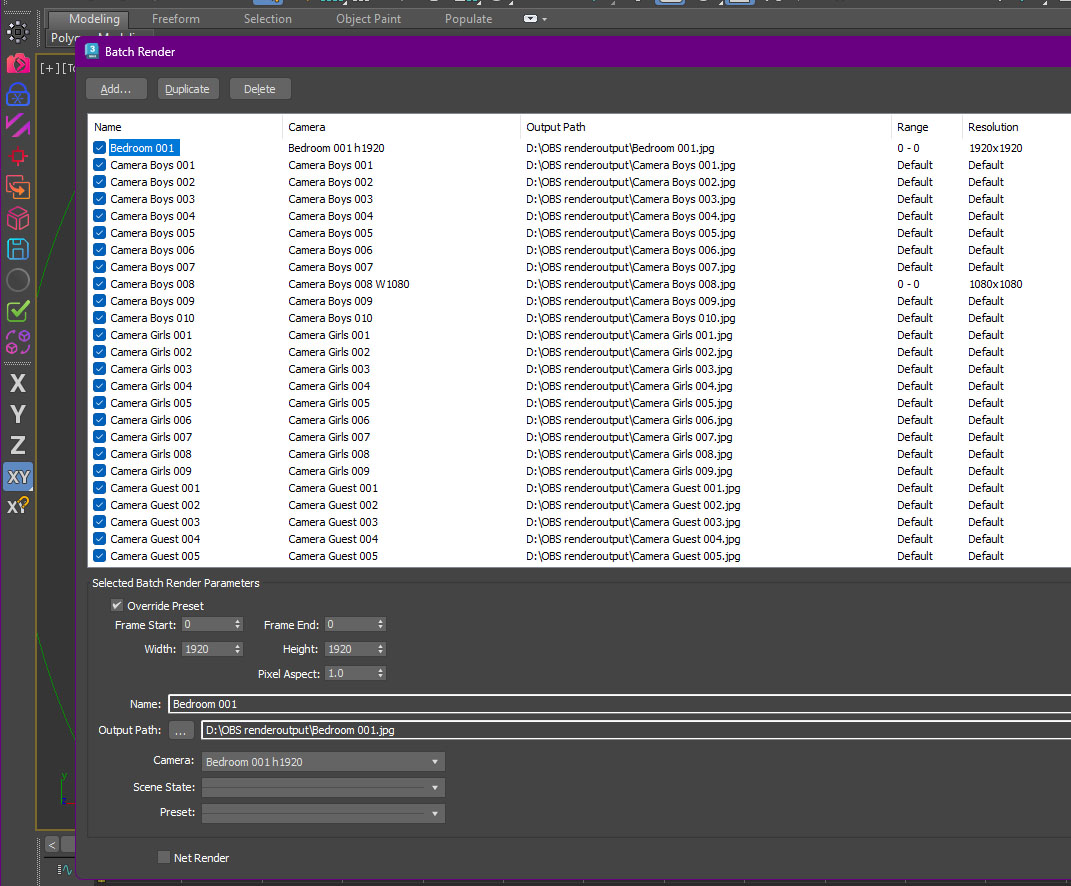
– Generate batch render views from selected cameras
– Smart duplicate detection with user choice dialog
– Options: “Update Existing & Add New” or “Add New Cameras Only”
– Automatic sorting of cameras by name for organized rendering
– Comprehensive statistics reporting after batch creation
X Button:
– Close ECamera2Batch interface
– Automatically restores original render resolution
– Restores Corona camera visibility states
– Removes all viewport callbacks safely
🎯 SMART CAMERA NAME PARSING
(Used when custom attributes are not present)
Automatically extracts render parameters from camera names using intelligent pattern recognition:
– Supports width (w), height (h), and frame (f) parameters embedded in camera names
– Parameters must be preceded by a space and followed by numbers
– Cleans camera names by removing detected parameters for batch view naming
– Process multiple selected cameras simultaneously with one click
– Automatic alphabetical sorting for organized batch render queue
– Creates unique batch render views with intelligent naming
– Duplicate detection system prevents accidental overwrites
– Smart duplicate handling dialog with two workflow options:
• Update existing entries and add new cameras
• Skip existing entries and only add new cameras
– Detailed statistics reporting:
• Views created/updated count
• Total cameras processed
• Number of views with custom render settings
– Integration with 3ds Max Batch Render Manager
– Automatic refresh of Batch Render dialog for immediate visibility
– Full support for all 3ds Max image formats (JPG, PNG, TGA, EXR, etc.)
– Custom output directory selection via standard file browser
– Automatic file naming based on cleaned camera names
– File extension handling based on user format selection
– Output path + camera name + extension = complete output filename
– Validation checks for file format selection
– EKDtools docking system integration for persistent UI
– Dockable interface can be placed in left, right, top, or bottom docks
– Viewport change callbacks for automatic resolution switching
– File pre-save callbacks prevent saving temporary resolutions
– Render parameters changed callbacks track manual user modifications
– Clean shutdown with automatic restoration of all modified settings
– Persistent global functions survive script closure for continued operation
– Session-based custom attribute definition for optimal performance
Scenario 1 – Using Custom Attributes:
1. Select all cameras in your scene
2. Click “+Att” to add resolution attributes
3. Switch to each camera viewport and adjust resolution spinners in Modify Panel
4. Switch between cameras → resolution changes automatically
5. Select cameras and click “Create Batch” for batch rendering
Scenario 2 – Using Name Parsing:
1. Rename cameras with parameters: “Camera01 w1920 h1080 f50”
2. Select renamed cameras
3. Click “Create Batch” → batch entries created with parsed settings
4. Render without additional configuration
Scenario 3 – Hybrid Workflow:
1. Use custom attributes for main cameras (detailed control)
2. Use name parsing for quick test cameras (rapid setup)
3. Both types work together seamlessly in batch render
Scenario 4 – Corona Renderer:
1. Add custom attributes to Corona cameras
2. Set up visibility override with exclude list in Corona camera
3. Switch viewports → objects hide/show automatically based on camera settings
4. Create batch renders with correct visibility for each camera
– Architectural Visualization – Multiple camera angles with different compositions and resolutions
– Product Rendering – Various product views with specific render sizes per angle
– Animation Studios – Batch process multiple camera sequences with frame-specific renders
– Game Development – Generate viewport renders at different aspect ratios
– Marketing Agencies – Consistent multi-angle product shots with automated resolution management
– Corona Renderer Users – Automatic visibility override management per camera
– VR/360 Projects – Different cameras with unique resolution requirements
– Multi-resolution Workflows – Mix 4K, HD, and custom resolutions in single scene
– Autodesk 3ds Max 2020 or later (tested up to 2026)
– Windows operating system (Windows 10/11 recommended)
– No additional plugins required
– Compatible with all renderers (special Corona Renderer integration)
– Minimal memory footprint
– EKDtools docking system (integrated in script)
– Global variables persist across script sessions for optimal performance
– Safe error handling prevents crashes from invalid camera objects
– Automatic cleanup of temporary global variables after dialogs close
– Rollout interface integrates with existing EKDtools if present
– Corona camera detection via class name pattern matching
Transform your 3ds Max rendering workflow from hours to minutes with ECamera2Batch – the professional’s choice for intelligent camera batch processing with automatic viewport resolution switching.
Single Machine Use Each license is valid for installation and use on one designated computer only.
Non-Transferable Licenses are tied to the original hardware and cannot be transferred to another machine.
Hardware Modifications Significant changes to the licensed computer’s hardware—such as replacing the motherboard, CPU, or GPU—will render the license invalid. In such cases, a new license purchase is required.
Annual License Validity This software is licensed on an annual basis. The license remains active and valid for a period of twelve (12) months from the original date of purchase, subject to compliance with all applicable terms.
Free Updates Customers will receive free updates for all versions released under the same major version number as the one purchased. For example, if you purchase version 1.xx, all updates up to but not including version 2.0 will be available for free via the original purchase link. Major version upgrades (e.g., from 1.x to 2.x) will require a new license purchase.
Limited Support Period Email support is available for up to six (6) months from the date of purchase. Support requests beyond this period may not be honored or may require an additional support plan.
Policy Compliance Usage of the software is subject to the terms and conditions outlined in our website policy.
Prohibited Actions
Reverse Engineering: Any attempt to reverse engineer, decompile, or disassemble the software, or use any part of it separately, is strictly prohibited.
License Manipulation: Any attempt to manipulate, forge, or tamper with the license file, license key, or the collected hardware ID will result in immediate license invalidation.
No Refund Policy: Licenses invalidated due to unauthorized actions—including hardware ID manipulation or reverse engineering—are not eligible for refunds under any circumstances.
Reviews
There are no reviews yet
Be the first to review “ECamera2Batch” Cancel reply




Reviews
There are no reviews yet